lavaflow
From raw file to analysis — assembled by clicking
Pick a source, add steps, set a target — the preparation is done. lavaflow turns raw data into a dependable table: visible on a canvas, versioned like source code, scheduled like any other job. Build it with the mouse, in Python, JavaScript or SQL — or let the assistant do it.
- Where
- Console → Automatisieren → lavaflow
- Steps
- Python, JavaScript, SQL, rules and AI
- Sources
- Files, tables, connections and HTTP APIs
- Targets
- A table in the lake, or a file to hand on
- Build it
- by mouse, in code, or from the assistant
DWH automation: repeatable data pipelines
DWH automation connects loading, transformation and data updates into repeatable workflows. In lavaflow, you define sources, processing steps and targets, test a draft and publish a version. Schedules and chained jobs handle recurring execution; run history helps investigate failures.
Improve data quality before it reaches reporting
Start with specific rules for the data behind your metrics. The quality-check step in lavaflow can validate allowed values, integers and text lengths. This step passes data onward only when the full check succeeds.
For example, an order-status column should contain only approved statuses. An allowed-value list catches unexpected spellings before the next processing step. Investigate the source or adjust the transformation, then test the workflow again. Data quality becomes a verifiable part of the pipeline.
Pyro prepares your data
Describe the transformation and let Pyro propose Python code. After your review, the code stays in the workflow and runs again without another AI call. A separate Pyro step classifies, extracts and summarizes data using the selected model on each run.
From data flow to business workflow
Quality checks, forecasts and HTTP requests extend data preparation. Platform actions start jobs, call published subflows, refresh dashboards and generate reports. Drafts stay separate from published versions; test runs and individual step results help you verify the workflow.
Built in minutes
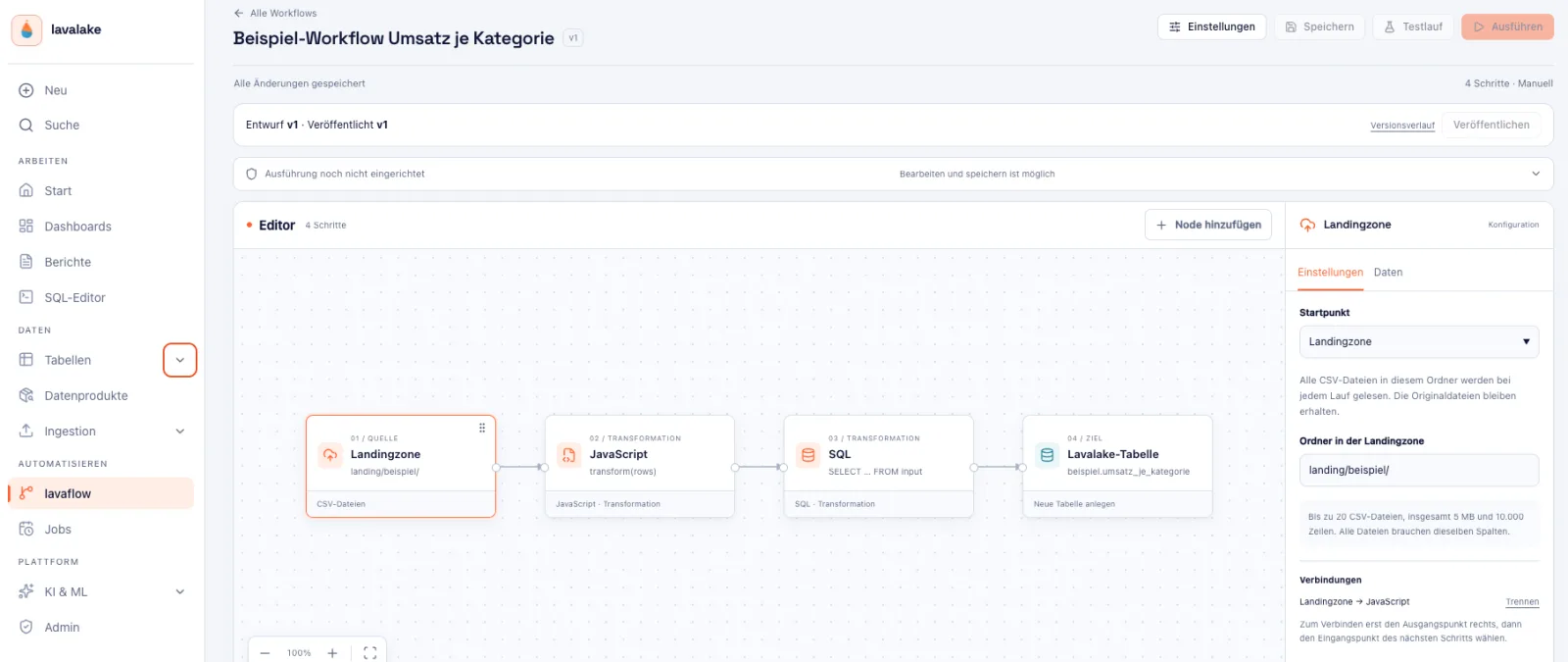
A workflow connects multiple sources, processing steps and targets. Conditions and switch nodes route rows into the right branches; merge nodes bring data streams back together. Every step can be tried on its own while you build, and the canvas shows what happens to the data at any moment. Open it six months later and you understand it in seconds — and can carry on building.
| Building block | Purpose |
|---|---|
| File drop | Pick up new CSV files from a folder as soon as they arrive. |
| Table as source | Build on what is already in the lake. |
| Python, JavaScript | Reshape in the language your people already speak. |
| SQL | Reshape with the means your analysts have long since mastered. |
| Column mapping | Rename, set types, drop columns — without a line of code. |
| Table as target | Create, append, replace, or reconcile through an upsert. |
| File output | Deliver results as CSV, Excel, JSON or XML. |
Every version stays
You work on a draft and publish a version — with a version history. Every earlier version stays visible and can be put back at any time. Reworking means: try it, compare it, publish it.
Changing a pipeline changes what tomorrow's numbers say. That is why every publication carries a date, a person and a version — readable years later.
The assistant builds the first draft
Describe what should become of which file and the built-in AI assistant places the steps. The proposal stands finished on the canvas: look it over, adjust it, publish it. An idea from a conversation becomes a running preparation in one go.
Part of the platform
lavaflow lives in the same installation as everything else: the same sign-in, the same audit chain, the same policies on the tables it reads and writes. It runs where your data already is — in your data center, on your hardware.
- One product, one vendor, one contract — and the data stays in the building.
- The same roles and permissions as the rest of the platform.
- Every run and every publication in the tamper-evident log.
- Pipelines can be scheduled and chained like any other job.
DataOps: review changes and operate traceable workflows
DataOps connects collaboration on data with repeatable testing and operational practices. Separate drafts and published versions, test runs and execution history in lavaflow support this approach. Agree who reviews changes, who publishes them and who handles failed runs. Platform features complement these responsibilities.
Where this sits in the platform
The same picture as on the home page: one platform, one authorization model, one store.
- Access: Console (SPA) · SQL worksheet · dashboards · AI assistant · MCP server — all behind one reverse proxy
- Identity & governance: Keycloak OIDC · token exchange per RFC 8693 · row-access and masking policies · WORM audit · lineage
- Compute: Trino under your identity · S, M and L workload classes in the Compose stack
- Catalog & table format: Apache Iceberg with Nessie: ACID · time travel · branching · schema evolution · open to Spark, Flink, Trino
- Storage & index: S3-compatible (MinIO, Ceph, NetApp StorageGRID, Dell ECS) · PostgreSQL with pgvector as the vector index
See it instead of reading about it
In half an hour we walk through the platform against your questions — ingestion, permissions, search, agent. No slides.
Book a live demo